Ask me for access
This case study is shared privately.
Contact me for the password, or enter it below if you already have one.
Incorrect password. Try again.
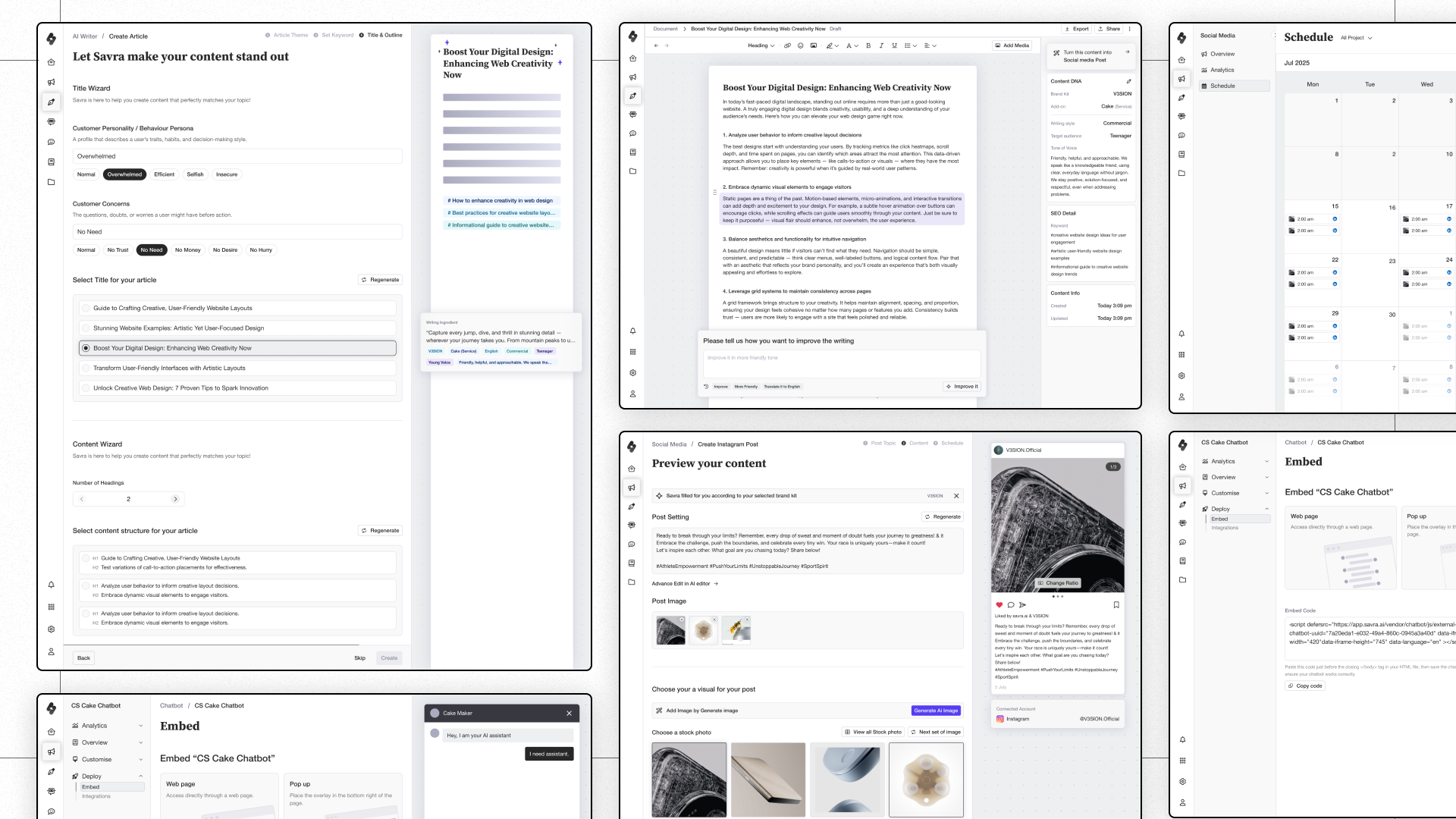
Overview
Savra AI is an all-in-one AI platform built for businesses, combining a customisable AI chatbot, social media management, AI writing tools, brand management, and a centralised knowledge hub. I joined as the solo product designer with one goal: take the product from an early, rough-edged prototype to a shippable, well-structured platform within six months.
That meant owning the entire design process: understanding the market, defining what the product should actually be, building the system that would scale it, and making sure engineering could ship it cleanly.
Summary
Savra AI arrived as a 35-feature AI platform with no product structure and no onboarding, so a new user landed straight in an empty dashboard with no path to follow. Chatbot, social media, and brand voice each stored their own copy of company information, so that same user set the same details up again for every feature they touched.
The heuristic evaluation traced that duplication to one root cause: every feature was really asking the same question, who is this company. A Knowledge Hub consolidated that data into one place every AI feature could read from, and a step-by-step onboarding flow, built from scratch, gave a new user a guided path instead of a blank screen.
A tokenized design system, built before any high-fidelity screen, kept the interaction patterns consistent across all six product sections. On top of it sat one set of rules for how the product's AI behaves: how it fills things in, how a user corrects it, and when it asks instead of assuming, so using Savra's AI felt the same whether someone was writing a post, drafting an article, or training a chatbot.
Feature overview
Oversees all brand communication from the top down, ensuring every message reflects a consistent, recognizable identity.
Plans, manages, and publishes promotional and social content across all channels to amplify your brand presence.
Creates on-brand content such as blogs, articles, captions, and campaign copy that align perfectly with your tone of voice.
Builds intelligent chatbots to nurture customer relationships, automate support, and scale conversations effortlessly.
The challenge
Savra AI had over 35 features across six major product areas. Many were broken, inaccessible, or undefined. There was no information architecture, no design system, and no shared understanding of who the product was for or what it was trying to do. The AI SaaS market was moving fast, with well-funded competitors shipping weekly.
As the only designer on the product, I had to make a deliberate call early on about what would get deep attention and what wouldn’t.
I put research, product structure, design system architecture, and handover documentation first, because those were the decisions that would determine whether the product could scale and ship cleanly. Wireframes and high-fidelity UI came after, shaped by that foundation. Branding and marketing sat in extended scope: worth doing, and first to be cut if the core ran late.
If the structure is wrong and the system won’t scale, polish doesn’t save you.
01 Research & competitive intelligence
Weeks 1–2 · June 16–27
Before touching Figma, I needed to know what the product actually did. The written description and the live product turned out to be two different things.
I tested every one of Savra AI’s 35 features myself, documenting what worked, what was broken or inaccessible, and what simply didn’t exist yet. That audit gave me an honest picture of the product’s real starting point and shaped how we scoped the six months ahead.
I ran it as a heuristic evaluation. Every feature was scored against the same four questions: is it reachable, does it do what it claims, is the pattern consistent with the rest of the product, and would a first-time user know what to do. Issues were logged straight onto the screens and grouped by severity, and that grouping is what let me argue for cutting features instead of fixing all 35.
- Annotating UX issues directly on the AI Bots screens, from CTA sizing to whether a list should become a table.
- Mapping the AI Bots feature end to end (Configure, Customise, Train, Deploy, Channel) and logging structural gaps at each step.
- The same treatment applied to AI Writer, tracing template creation through to the generated document.
At the same time, I ran a structured competitor audit across 12+ tools, including Canva, Midjourney, Adobe Express, Freepik, Google Flow, Databutton, Fin, HIX AI, and Botsonic, with four specific focus areas: AI chatbot creation, brand voice management, knowledge base tooling, and social media workflows. I wanted to know which mental models users were already arriving with, and where Savra could be more coherent than any of them.
- The audit map for the chatbot creation focus area, covering every competitor tool benchmarked for that feature.
- A close read of Zapier's Chatbots product, tracing onboarding through to knowledge-source setup.
- A positioning map plotting competitors on text vs. visual and general vs. brand-customised, showing where Savra had room to differentiate.
I closed this phase by building a product use case framework with the founders: target audience × use case × intended outcome. It became the decision filter for every structure and flow call that followed.
What this produced: an agreed, evidence-backed picture of what the product needed to be, settled before anyone drew a screen.
02 Product structure & wireframes
Weeks 3–9 · June 30 – August 15
With research in hand, I built a full product structure map before any wireframe work. Jumping straight to screens without an agreed architecture means redesigning flows mid-build, which is expensive for everyone.
- The Onboarding flow, restructured into Login, Company Information, Tutorial, and Brand Setting.
- The consolidated Knowledge Hub, unifying Brand Voice and Knowledge into one source of truth for the AI.
- The AI Chatbot feature, from dashboard and flow creation through configuration, knowledge, and themes.
The structure work surfaced a bigger problem than two overlapping sections. Every feature had its own content library, and none of them talked to each other. Social Media stored campaign details and company news. Chatbot stored company information, the website link, and product details. There was no central place holding any of it, so a user re-entered the same company details every time a different feature asked for them.
Brand Voice, AI Chatbot, and AI Social Media were just the features where the duplication was most visible, since all three were really asking the same question: who is this company. I consolidated everything into a single Knowledge Hub, tagged the data by type, and let chatbot, social media, and writing tools all read from that one source instead of holding their own copies. That removed the duplication, cut a whole branch out of the IA, and meant a user only entered their company details once.
The research is what produced this decision.
- Three rounds of information architecture, evolving from a single flat list to a grouped, scalable IA.
- The full feature audit grouped by function, separating what worked from what didn't across all 35 features.
- The use case framework itself, mapping seven modular usage scenarios to target audience, features used, and outcome.
What this produced: a product structure map the whole team agreed on, and a set of IA decisions that kept the scope from drifting later.
With the product structure clear, I wireframed every major user journey, covering all six product sections:
AI Chatbot (creation, knowledge, Q&A, instruction, theme, embed, integration) · Social Media (post creation, scheduling, calendar, campaigns, analytics) · AI Writer & Editor (article flow, export, share, image generation, social media conversion) · AI Assistant (conversation, prompt library, templates, tools) · Knowledge Hub (brand voice, company profile, knowledge source, document content, Q&A) · Settings, Account, Dashboard
Brand voice is the soul of the product: it’s what makes Savra’s output sound like a specific company instead of generic AI copy, so how someone set it up couldn’t be an afterthought. The original product had no onboarding flow at all. A new company landed straight in an empty dashboard with nothing set up and no path to follow.
I designed a step-by-step flow from scratch that builds a company profile in a few clicks: import from the company’s website, upload a company document, or answer a short set of questions when neither exists. Point it at a website and the AI reads the page directly, pulling out tone of voice, target audience, branding, and marketing direction instead of asking someone to write their own brand summary from scratch. It’s the same step pattern used everywhere else in the product, so onboarding also became a first lesson in how the rest of it works.
- The full walkthrough grid across chatbot onboarding, knowledge hub, themes, and Q&A training.
- The AI Writer article flow, including generation, sharing, and export states.
I reviewed my own work weekly across sections to catch cross-feature inconsistencies early. A pattern that worked in chatbot creation had to map cleanly onto how AI Writer handled the same idea. Without that pass, the product would have read as six features stapled together.
The harder problem under the screens was data. Brand Voice, stored once in the Knowledge Hub, had to flow into Social Media and AI Writer so a company’s tone stayed the same everywhere instead of being redefined per feature. Wireframing forced me to trace that explicitly: where each piece of data was created, which features read it, and what should happen when it changed. That tracing is what made the Knowledge Hub consolidation, above, hold up in practice.
- Brand voice, tone of voice, and target audience created once in the Knowledge Hub.
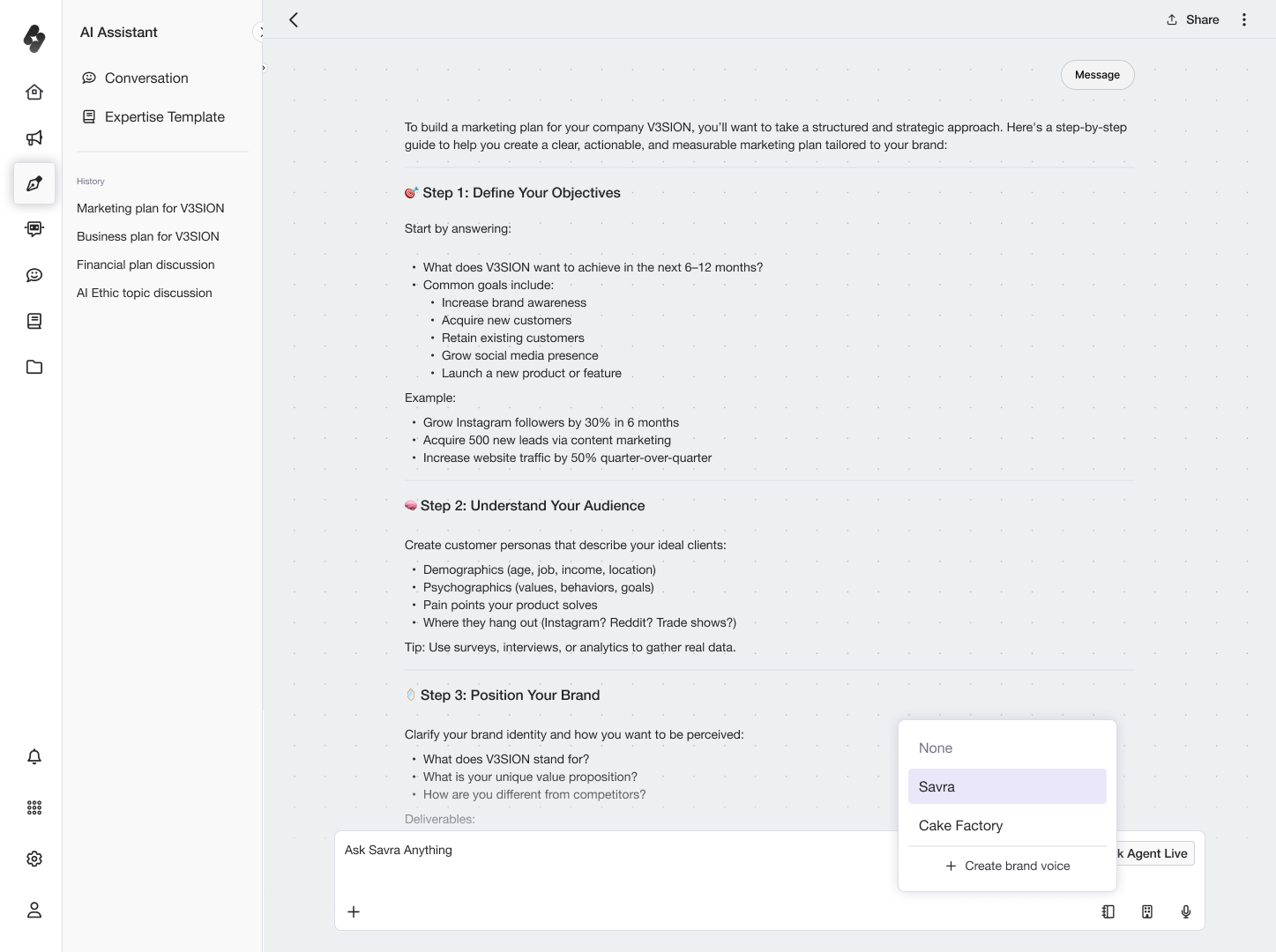
- That same brand voice data reused directly inside the Social Media post creation flow.
- Brand voice and knowledge source reused again inside AI Writer's template creation flow.
Three rounds of wireframe presentations with stakeholders locked the scope before moving to visual design.
03 Design system architecture & developer handover
Weeks 10–14 · August 18 – September 19
This is the work I’m most proud of on this project, and the most invisible.
Once the product structure was defined and wireframes were underway, I stopped and built the design system before touching a hi-fi screen. With six product sections to design and one designer to do it, the system was the only way to ship consistently at that pace.
- Typography and colour exploration, testing multiple typefaces and palettes before settling on the final system.
- The finalised typography scale, colour application rules, primitives, and pixel spacing table.
Token architecture
I built the colour system in two layers using Figma Variables. The primitive layer held raw values: every colour, spacing unit, and type size the product would ever use. The semantic layer mapped those values to their UI purpose: background, surface, border, text-primary, and so on. This meant changing a brand colour touched one primitive token and cascaded everywhere it was used, without touching individual components or screens.
Dark and light themes were built into the token structure from day one. Switching themes was a variable swap.
I aligned the token naming conventions to Tailwind’s on purpose, so developers could read a token name and map it straight onto their stack without translating anything.
- The semantic colour token collection, with matching light and dark values for every content, background, and stroke role.
- The Font Theme collection, defining brand and plain typefaces alongside static weight and tracking values.
- The Typescale collection, composing font, weight, size, and line height into named heading and body styles.
Library architecture
The design system lived in two separate Figma library files: one for the foundation (tokens, type, colour), one for components. Any product design file connected to these libraries could update the entire visual system by swapping the library reference, with no manual find-and-replace and no inconsistencies between files.
Component library
I built every UI component systematically, 20+ components in total, and applied each one to live design files as it was completed rather than batching the work: buttons, inputs, dropdowns, icon set, tabs, accordion, banners, search, calendar, image upload, table, filter, checkbox, card buttons, writing menu, AI generate box. Building and applying in parallel meant the UI files were always up to date and components were stress-tested in real layouts as they were built.
- The basic set: icons, buttons across three sizes and states, tabs, and labels.
- Form elements: inputs, dropdowns, and filters, each broken down into their building blocks.
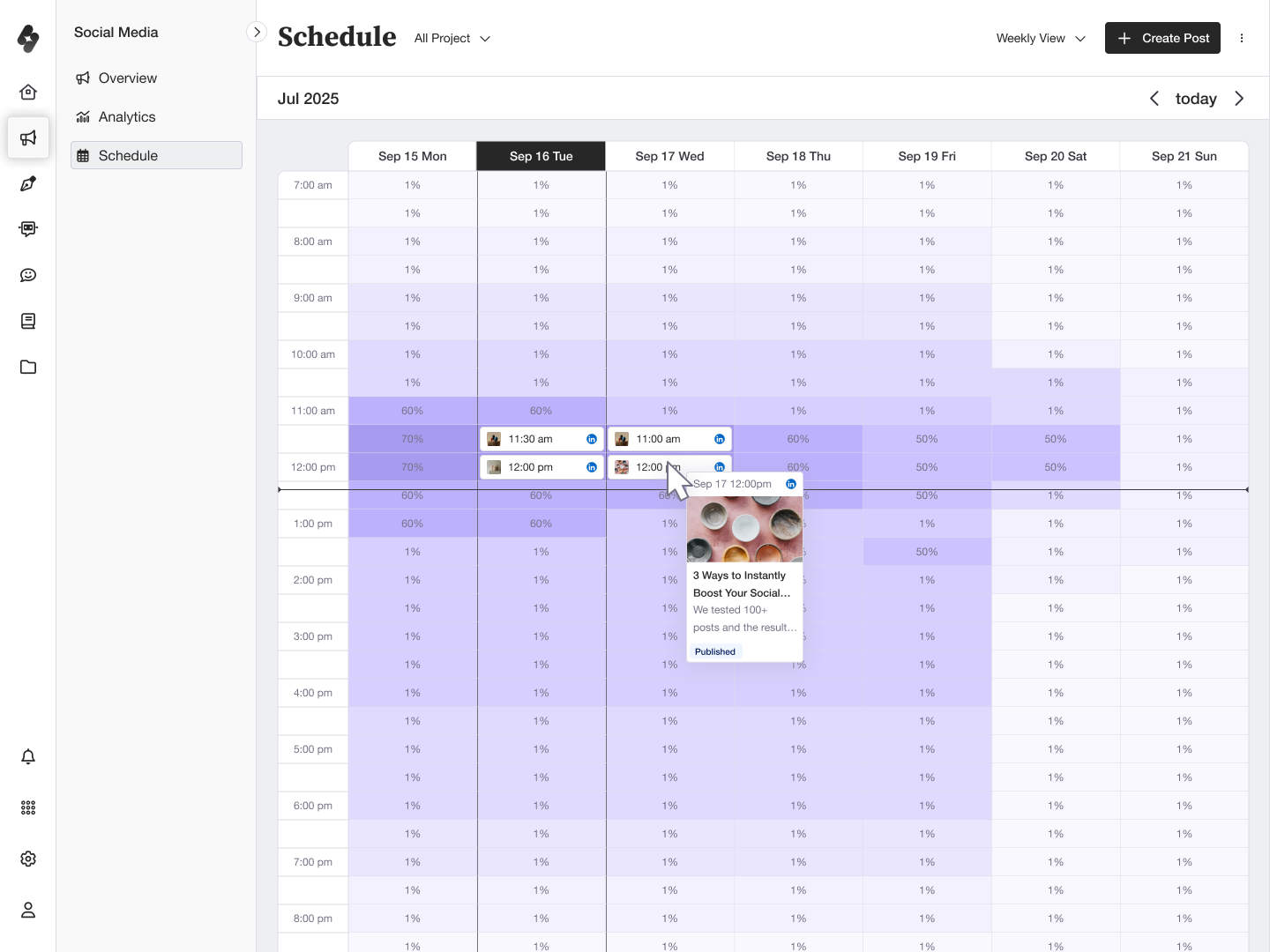
- The table and calendar components, applied directly to real features like the Knowledge Hub and Chatbot tables.
What this produced: a tokenised design system that sped up the hi-fi phase and held six product sections to the same patterns.
04 High-fidelity UI
Weeks 14–19 · September 16 – October 24
With the design system built first, the hi-fi phase moved quickly. Every screen was assembled from existing components, laid out with auto layout and held to the token values, with no one-off styles or ad hoc decisions mid-design.
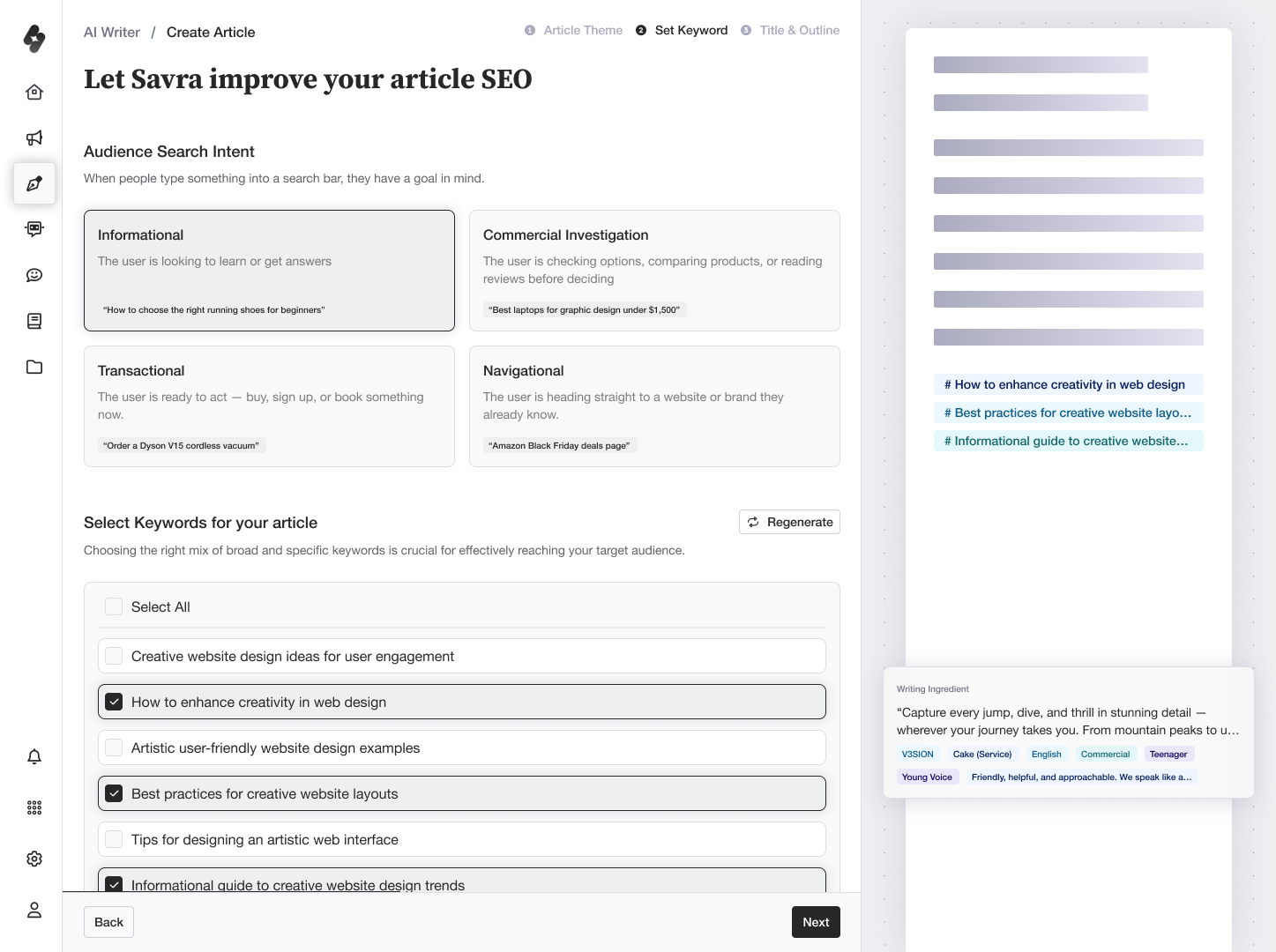
- The AI Writer Create Article journey, from article theme through keyword setting to title and outline.
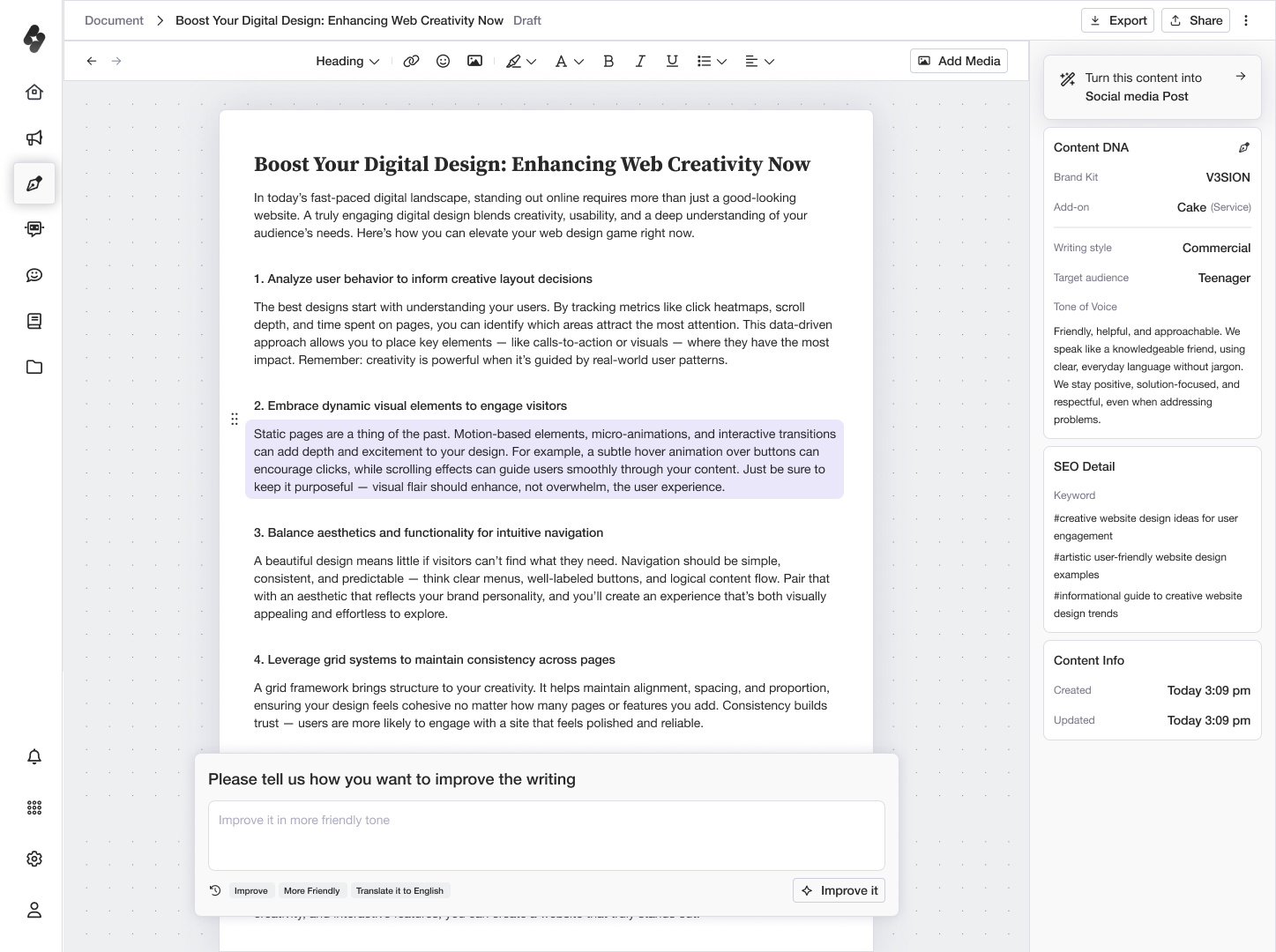
- AI Writer content editing, including AI-generated image and media upload states.
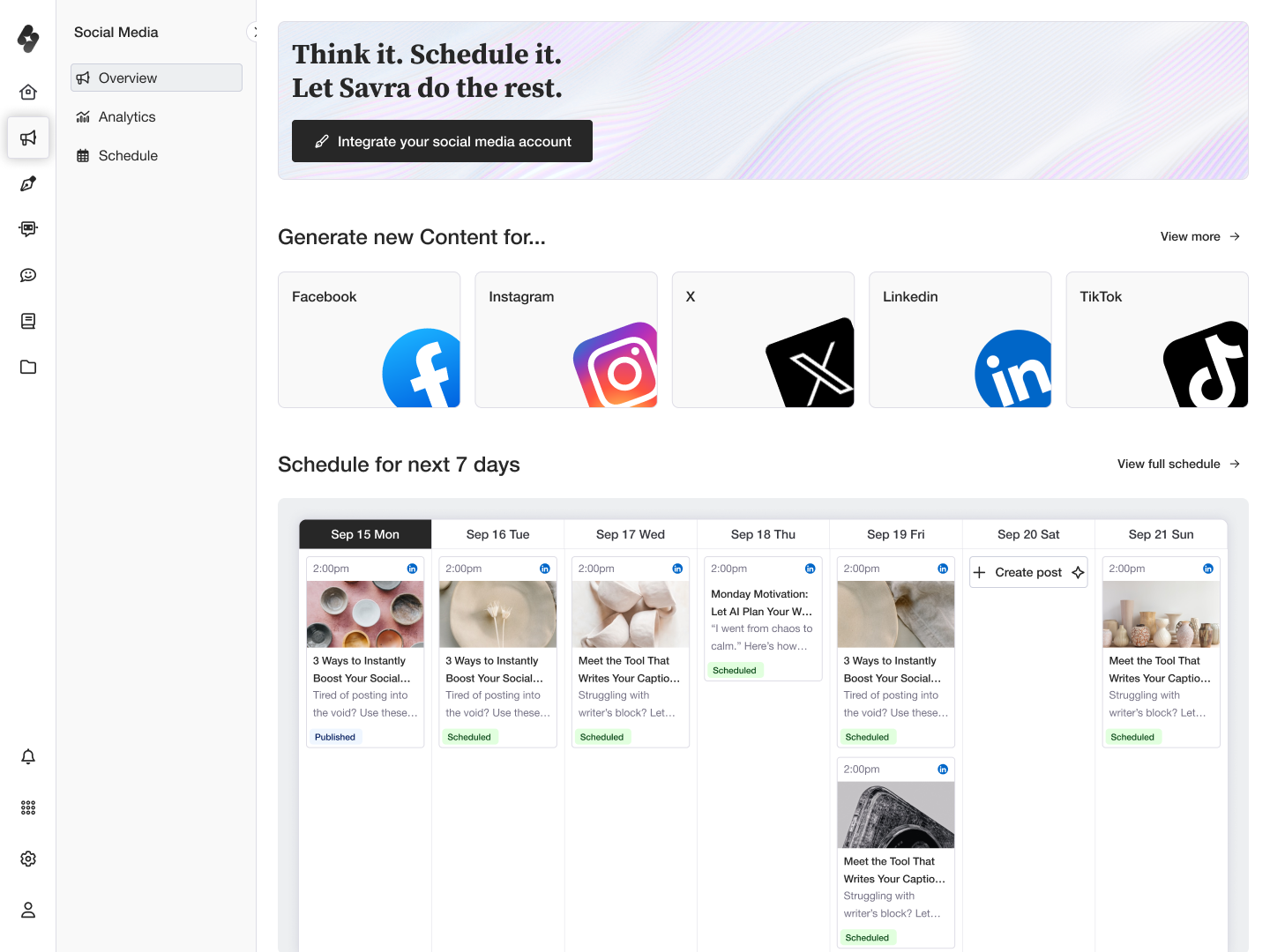
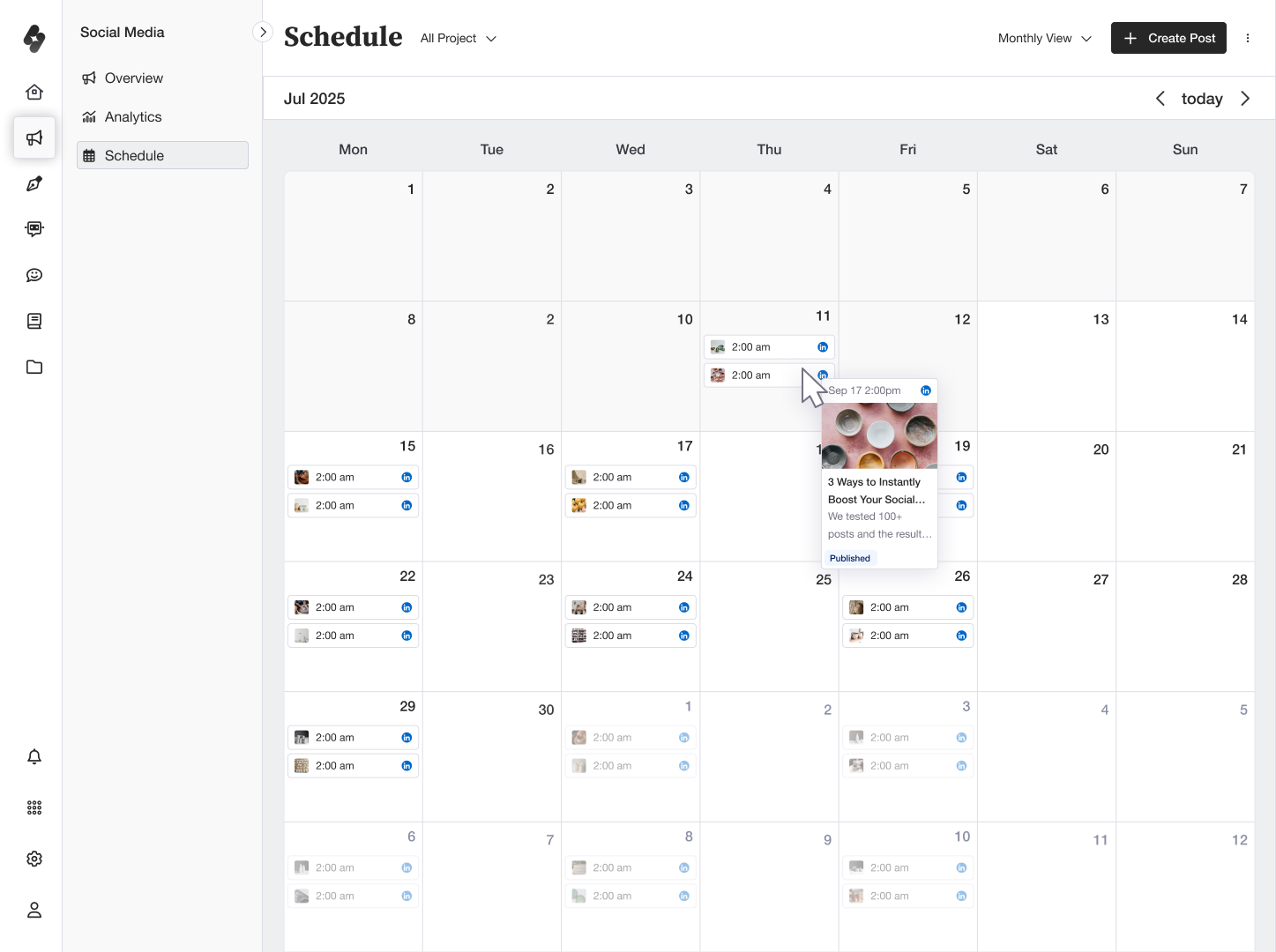
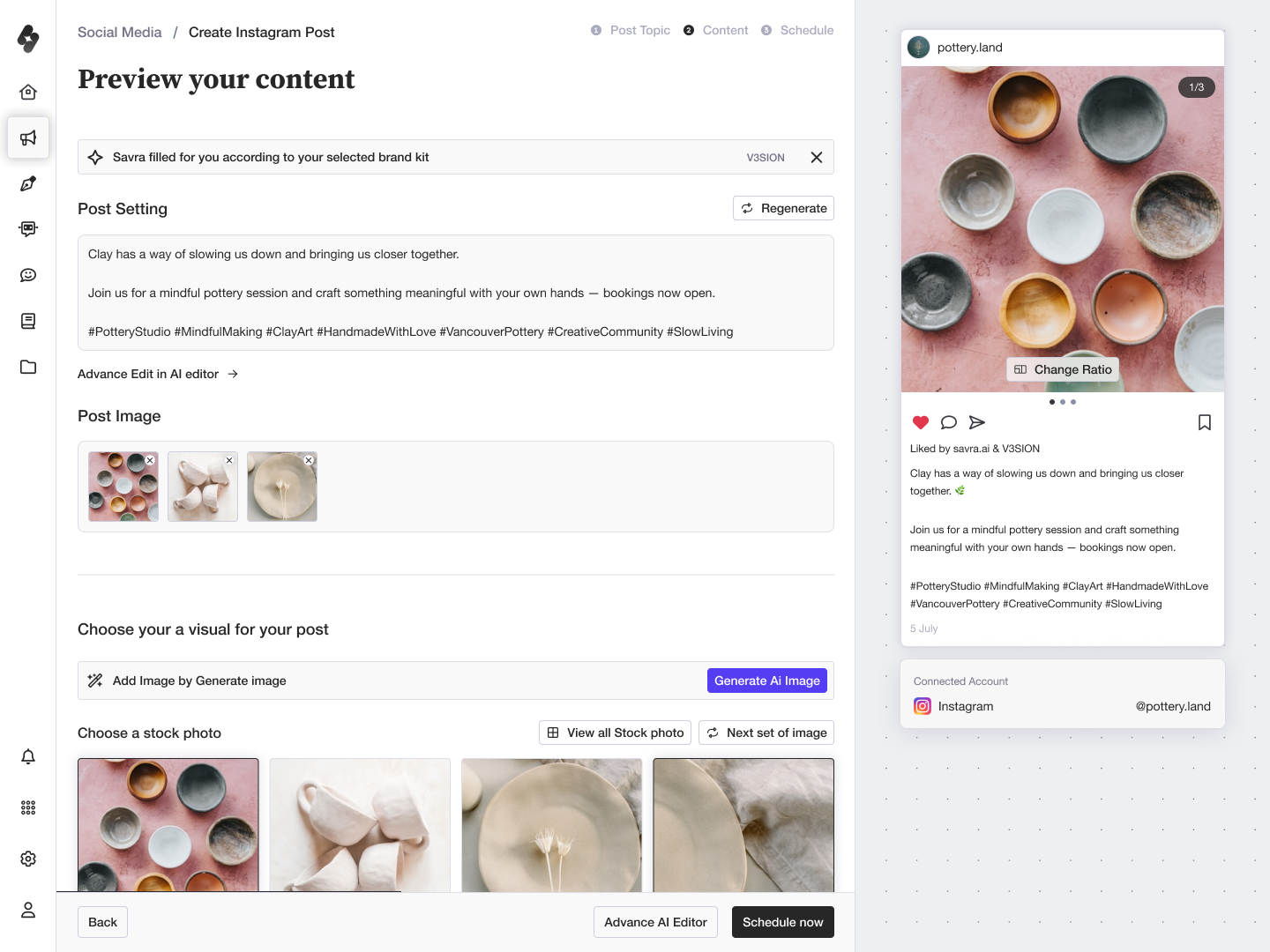
- The Social Media Create Post journey, from topic through content and scheduling to the live demo preview.
I worked through each section sequentially: Social Media → AI Writer → AI Editor → Chatbot → Knowledge Hub → Onboarding → Settings. After the first pass, I ran a full refinement round, incorporating meeting feedback, tightening hierarchy, and validating every screen in both light and dark modes.
05 Designing for AI: control, transparency, and recovery
Cross-cutting · July – October
Every flow in Savra generates something, so the hardest questions on this project were about behaviour. How much should the product do before it’s asked? How does someone tell where an output came from? What do they do when it’s wrong? I settled a set of rules early and applied the same ones across Social Media, AI Writer, and Chatbot, so the product behaved the same way whichever tool a user was in.
The AI can fill, but every fill is labelled and reversible
Savra pre-writes captions, titles, and outlines from the user’s brand kit. Generating by default is faster, and it costs trust: people can’t tell what the system decided on their behalf, so they either accept output they haven’t read or throw all of it away. The fix was attribution at the point of insertion. A dismissible chip sits directly above the generated caption naming its source, “Savra filled for you according to your selected brand kit,” so the user can see what was filled, which kit fed it, and clear it in one action without leaving the flow.
- Attribution at the point of insertion: the generated caption says which brand kit produced it, and the chip clears in one click.
Inputs stay visible beside the output
In the AI Writer editor, the Content DNA panel holds brand kit, writing style, target audience, tone of voice, and SEO keywords alongside the document, instead of leaving them behind in the modal that generated it. In most AI tools, revising a result means re-prompting from memory. Here the user changes a named input and regenerates, so the thing they adjust is the same thing they can see.
- Content DNA: every input that shaped the document stays visible and editable next to it.
Generation runs in steps
Post creation runs Post Topic → Content → Schedule; article creation runs Article Theme → Set Keyword → Title & Outline → Content. Splitting generation into checkpoints lets someone correct the direction before an error compounds through everything after it, and gives the model narrower context at each step.
- Post creation, staged as Post Topic → Content → Schedule.
- Article creation, staged as Article Theme → Set Keyword → Title & Outline.
What this produced: the same AI behaviour in all three product areas, so attribution, correction, and control work identically whether a user is writing a post, drafting an article, or training a chatbot.
06 Additional scope: brand & marketing
Parallel track · September – November
Running alongside the product UI work, I handled the brand identity from scratch: logo design, brand guidelines (clear space, colour palette, typography), and logo motion in two directions.
- UI style testing for the two finalist directions, validated on real screens in both light and dark mode.
- The finished logo guidelines: logomark usage, backgrounds, clear space, colour palette, and typography.
- One of two logo motion directions, animating the logomark itself.
When the product UI was stable, I extended into the marketing layer: landing page design, social media asset sizing guide, cover banners, and a Framer build with the design system configured and responsive behaviour checked.
- The landing page built in Framer, from the hero and brand messaging through to a feature spread for Social Studio.
None of this was in the original brief. The product needed a brand before it could launch, and picking it up meant the team didn’t have to hire for it.
Outcome
Design handed over in November 2025 and the build is partly complete. Engineering started with onboarding, the Knowledge Hub, Social Media, and Chatbot, with the rest of the product still in progress.
The foundation is the part I can point at. The token system and component library meant engineering was assembling screens from an existing set of parts instead of defining new styles for each one, which is what kept the handover a short conversation instead of a long back-and-forth over every screen.
The consistency held up as those same sections went from design into build. Each one landed with the same interaction patterns: attribution on anything the AI generated, inputs left visible next to their output, generation broken into steps instead of one black-box action. None of that had to be re-decided per feature, because the rules were set once, early, and reused everywhere they applied.
Reflection
Shipping this solo in six months came down to constant prioritisation. The three calls I’d defend are consolidating the Knowledge Hub, mapping the product structure before wireframing, and building the token system before any hi-fi work. All three made everything after them faster.
The design system did the most work for me. It sped up the UI, kept it maintainable, and turned the handover to engineering into a much shorter conversation. With one designer and six months, that foundation is what bought the time for everything else.
It was also the most ownership I’ve been handed on a product, and the most fun I’ve had building one.